Custom Journal: Daily Prompts4.2.4
Publisher Description


Design your own journal. Daily prompts, gratitude, mood & habit tracker, diary
Design your own journal with your own prompts, questions, and trackers. Try Premium free for 5 days.
Most journal apps make you fill in someone else's template. Custom Journal is different: you build your own. Write your own journal prompts and questions, add rating scales, checklists, and mood tracking, and end up with a daily journal that actually fits the way you think.
DESIGN YOUR OWN JOURNAL
• Build templates from questions, prompts, 1-10 ratings, multiple choice, checklists, and banners
• Not sure where to start? Begin with a built-in template: Five Minute Journal, Gratitude Journal, Habit Tracker, Weekly Review, or Free Write
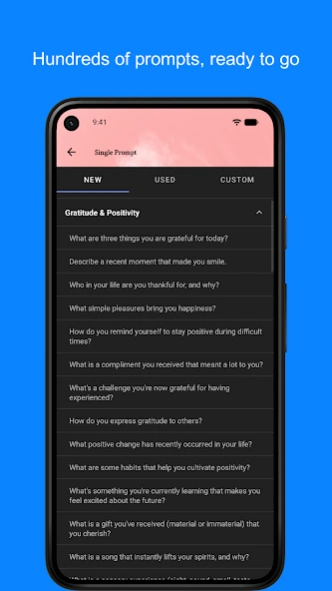
• Pick from a library of daily journal prompts for gratitude, reflection, and self-discovery
• Schedule templates to repeat, like a morning check-in every day or a review every Sunday
• Share templates you've made with friends
MAKE IT A DAILY HABIT
• One entry per day keeps journaling quick. Most people finish in 5 minutes
• Keep your streak alive: a flame on today's page shows how many days in a row you've written
• Daily reminders so you never forget to write
• Track your mood on every entry and see it on the calendar
• Add photos to capture the moment
• Jump to any past entry from the calendar, or search everything you've written
• Home screen widget, dark mode, custom fonts, and your own background images
PRIVATE BY DESIGN
• No ads. No account required
• Your entries stay on your device, not on our servers
• Lock your diary with a PIN or your fingerprint
• Back up to your own Google Drive and restore whenever you want
• Export your journal as text at any time. Your data is yours
CUSTOM JOURNAL PREMIUM (5-DAY FREE TRIAL)
• Create and edit your own templates
• 1,000 extra journal prompts in ten categories, or write your own
• Turn your ratings, habits, and answers into charts and watch your progress over time
• Streaks for every habit you track
• Multiple journals to organize different areas of your life
• Automatic Google Drive backup, and sync between your devices
• Export your journal as a PDF to keep or print
PERFECT FOR
Gratitude journaling, habit tracking, five minute journaling, bullet journaling, mood tracking, fitness and health logs, dream journals, travel diaries, daily planning, and self-care.
Start with a blank page, a built-in template, or a single prompt. However you begin, the journal you end up with is completely yours.
About Custom Journal: Daily Prompts
The company that develops Custom Journal: Daily Prompts is Journal & Daily Diary App. The latest version released by its developer is 4.2.4.
To install Custom Journal: Daily Prompts on your Android device, just click the green Continue To App button above to start the installation process. The app is listed on our website since 2026-09-07 and was downloaded 13 times. We have already checked if the download link is safe, however for your own protection we recommend that you scan the downloaded app with your antivirus. Your antivirus may detect the Custom Journal: Daily Prompts as malware as malware if the download link to com.jerrysha.custommorningjournal is broken.
How to install Custom Journal: Daily Prompts on your Android device:
- Click on the Continue To App button on our website. This will redirect you to Google Play.
- Once the Custom Journal: Daily Prompts is shown in the Google Play listing of your Android device, you can start its download and installation. Tap on the Install button located below the search bar and to the right of the app icon.
- A pop-up window with the permissions required by Custom Journal: Daily Prompts will be shown. Click on Accept to continue the process.
- Custom Journal: Daily Prompts will be downloaded onto your device, displaying a progress. Once the download completes, the installation will start and you'll get a notification after the installation is finished.
Program Details
System requirements
Download information
Pricing
Version History
version 4.2.4
posted on 2026-09-07
Journaling streaks are here! 🔥 Tap the flame on today's page to see your current streak, your week at a glance, and streaks for the habits you track.
Also new:
• Collapse prompts to keep long entries tidy: collapse all, expand all, or just hide the empty ones
• Search by date, and jump to any month or year from the calendar
• Export presets (last 30 days, this year, all) plus a jump-to-date picker
• Hide empty prompts when sharing as an image
• Fixes for backups, PDF export, and Android 16
version 4.1.0
posted on 2025-04-19
• Fixing a bug where PDF creation was failing
• Improving sharing options for text and PDF
version 4.0.5
posted on 2025-03-22
* Single Prompts – Get quick, insightful prompts for daily reflection in just one tap.
* Enhanced Search – Find what you need faster with seamless, smart search navigation.
version 3.9.1
posted on 2024-11-09
* Android 15 compatibility support
* UI fixes
version 3.8.2
posted on 2024-07-24
* Updating library versions and minor bug fixes
* Fixing bug where alarms are not working due to permissions
version 3.8.1
posted on 2024-01-14
* More emojis
* Android 14 support
* Sync between Android devices
* Icon update
* Bug fixes and Performance improvements
version 3.7.0
posted on 2023-02-28
* Fixing a bug where the custom background image was not working on Android 13
version 3.3.2
posted on 2022-02-24
* Adding an option to show last updated time for a journal entry. Enable in Settings.
* Bug fixes
version 3.2.1
posted on 2021-12-18
* Bug fix: prevent keyboard from appearing while dragging checklist items
* Show only template schedules for selected books. Adding a setting to re-enable showing all template schedules.
version 3.1.1
posted on 2021-11-11
* Fixing the nav bar color for some devices
* Minor bug fixes
